
- Access Control System
How to Set Access Levels for Employees Using a Commercial Access System
- Locksmith Urbana IL
- 8 min read
- Urbana, IL. 61801 / 61802
Most guides on setting employee access levels for commercial access control hand you a vocabulary list, role-based, discretionary, mandatory, attribute-based, and leave you to figure out what to actually do with it. That’s the wrong starting point for a Champaign County business owner who isn’t running an enterprise IT department. The real question isn’t which theoretical model to choose. It’s a practical sequence: which doors exist, which roles need access to them, and when.
This guide walks through that actual process, plus a few maintenance realities almost no competitor addresses once the initial setup is done.
Start With the Principle, Not the Terminology
Before mapping a single door, it helps to have one organizing rule to apply consistently: the principle of least privilege. Give each role access to exactly what it needs to do its job, and nothing more.
This sounds obvious stated plainly, but it’s the rule most businesses violate without realizing it. In practice, most locksmiths see the same pattern during system reviews: a business grants broad access to new hires because it’s easier than sorting out exactly what they need on day one, and that broad access simply never gets narrowed later. A receptionist doesn’t need server room access. A part-time retail employee doesn’t need after-hours entry to a back office holding financial records.
Applying least privilege at setup, rather than defaulting to “give everyone access to make things simple,” is the single decision that determines whether your access control system actually functions as a security tool or just becomes an expensive replacement for a shared key.
The formal access control models, RBAC, DAC, MAC, ABAC, are different ways of implementing this same underlying rule at different levels of complexity. Most small and mid-sized Champaign County businesses don’t need to choose a model by name. They need a practical process, which is what the rest of this guide walks through.
The Practical Setup Process
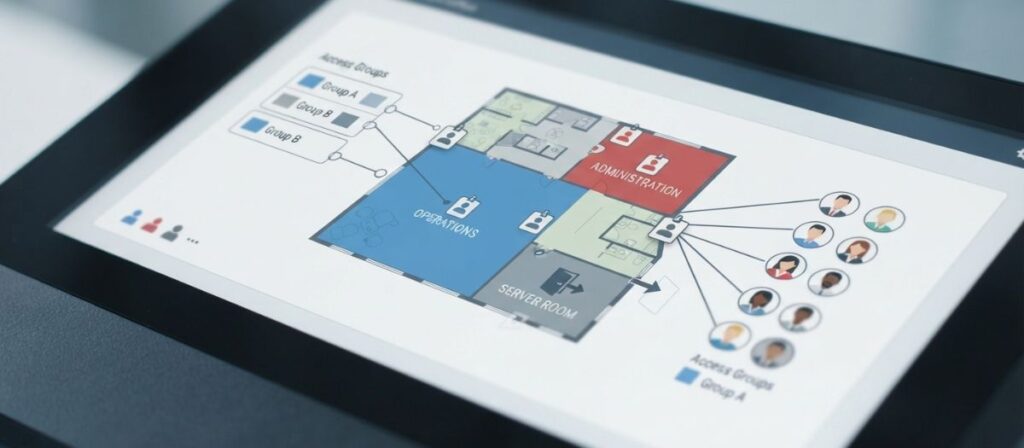
Step one: map your doors into zones. Walk your building and group doors by function and risk level rather than treating every door individually. A typical small office ends up with three to six zones, general entry, common work areas, storage or supply rooms, a server or records room, and executive or high-value areas. Most businesses don’t need dozens of unique access levels; they need a handful of well-defined zones that actually reflect how the building is used.
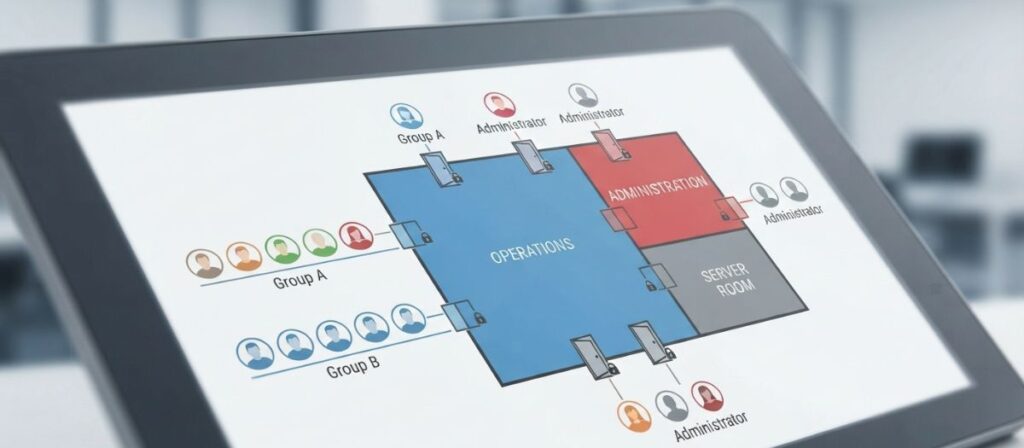
Step two: map your roles to those zones. Rather than customizing access person by person, group roles: general staff, department leads, facilities or maintenance, and administrators. Each role gets access to the zones it actually needs, not the zones it might conceivably need someday. A facilities or maintenance role typically needs broad physical access, mechanical rooms and utility closets included, while a general staff role usually needs only common work areas and entry points.
Step three: layer in scheduled, time-based restrictions. Access doesn’t have to be all-or-nothing by door, it can also be limited by time. A general staff credential might work during business hours only, while a manager’s credential works around the clock. This single layer, restricting when access works rather than just where, closes a real gap that door-only access levels miss entirely, since a valid credential used at 2 a.m. on a door that should only be active during business hours is a red flag worth catching automatically rather than after the fact.
Step four: document the access matrix in writing. A simple table, roles down one side, zones across the top, marked with access and schedule for each combination, becomes your reference document. Configuration in the software itself should follow this written matrix, not replace it, since the document is what makes future audits and staff changes manageable rather than guesswork.
Contractors and Vendors Need a Different Approach Entirely
Competitor content mentions contractor access as a passing bullet point without explaining the actual best practice, and it’s a genuinely different problem than staff access.
A cleaning crew, a maintenance vendor, or a seasonal contractor should generally receive time-boxed, single-purpose credentials that expire automatically on a set date rather than requiring someone to remember to manually deactivate them later. If a contractor is scheduled for a two-week project, their credential should be configured to stop working after that window closes, not remain active indefinitely until someone notices and disables it.
This distinction matters because manual deactivation is exactly the kind of task that gets forgotten during busy periods, and an old contractor credential sitting active for months after a project ends is a genuine, avoidable security gap. If your access control platform supports automatic expiration dates, use that feature as the default for any non-employee credential rather than treating it as optional.
The Champaign County Reality: Seasonal and Student Staff
No competitor content connects access level design to the specific challenge Champaign County businesses near UIUC and Campustown face regularly: a workforce heavily made up of part-time student employees whose schedules and employment status shift with the academic calendar.
For a business relying on student staff, building access levels around semester-based expectations rather than assuming stable, year-round employment saves real administrative effort. This means designing an onboarding process that gets a new student employee’s access level correctly assigned quickly at the start of a semester, and just as importantly, an offboarding process that revokes access promptly when someone graduates, transfers, or simply stops showing up after finals.
The businesses that struggle most with access control in this specific market aren’t the ones with weak hardware, they’re the ones whose access levels drift out of sync with actual staffing because nobody built a fast, repeatable process for the constant turnover this area sees. If your business hasn’t reviewed its active credential list against your current staff roster recently, that’s worth doing now rather than waiting for an obvious problem to surface.
What Most Access Level Guides Don't Tell You
A handful of practical realities get skipped entirely across the competitor content we reviewed.
Access level creep is a real, ongoing problem, not a one-time setup risk. As employees get promoted, switch departments, or simply pick up extra responsibilities temporarily, they tend to accumulate access along the way, and that access rarely gets removed once the temporary need passes. A department lead who covered for someone on leave last year may still have that person’s zone access a year later, with nobody remembering why. Left unmanaged, this drift quietly erodes the entire point of having defined access levels in the first place.
Periodic access review needs to be a scheduled responsibility, not an occasional afterthought. Set a recurring review, quarterly works well for most small and mid-sized businesses, where someone actually checks the current access matrix against who’s currently employed and in what role. This is the maintenance step competitors mention as a bullet point at best and almost never frame as an ongoing operational task with an owner and a schedule.
The mechanical equivalent of this concept already exists in master keying. If you’re familiar with how a master key hierarchy structures access, individual change keys, department-level sub-masters, a top-level master key, electronic access levels follow the identical logic, just implemented through software rather than pin cylinders. Master Key Systems Explained blog covers that mechanical structure in depth if the comparison helps clarify how electronic tiers should be organized.
Not every door needs to be part of the electronic system at all. “How Access Control Systems Work With Existing Locks” blog covers what determines whether a specific door is a good retrofit candidate. Low-risk interior doors sometimes make more sense left on standard mechanical keys, keeping your access level structure focused on the doors that actually carry meaningful risk rather than every door in the building.
Frequently Asked Questions
What's the difference between RBAC and ABAC for a small business?
RBAC assigns access based on a person’s role or job function, which works well for most small and mid-sized businesses with clearly defined positions. ABAC evaluates multiple factors together, like time, location, and clearance level, and generally suits larger or more dynamic organizations with more complex access needs than a typical Champaign County business requires.
What are the basic categories access control decisions get grouped into?
Most systems organize decisions around who (identity), where (specific doors or zones), and when (time-based schedules), with additional layers like credential type and approval level added for more complex environments.
How many access levels does a typical small business actually need?
Most small and mid-sized businesses function well with three to six distinct access levels tied to zones and roles. Starting with the minimum number of levels that reflects your actual building layout, then refining as needed, works better than over-engineering the structure upfront.
How do I set up access levels for seasonal or student employees?
Build your onboarding and offboarding process around your specific staffing calendar, assigning access quickly at the start of each employment period and revoking it promptly when that period ends, rather than treating every new hire as a one-off manual task.
How often should access levels be reviewed once they're set up?
A quarterly review comparing your current access matrix against your actual staff roster catches most drift before it becomes a real security gap. Businesses with higher turnover, including those relying heavily on student or seasonal staff, may benefit from reviewing more frequently.
What's the biggest mistake businesses make when setting up employee access levels?
Granting broad access to new hires by default because it’s simpler upfront, then never narrowing it later. This violates the principle of least privilege and undermines the security value of having defined access levels in the first place.
Does setting up access levels cost extra beyond the access control system itself?
The configuration work itself is typically included in installation, but the time investment in mapping your doors, roles, and schedules correctly upfront saves cost later by avoiding a poorly structured system that needs to be redesigned. A locksmith or installer can walk through this mapping process with you during setup.
✅ Key Takeaways
Setting employee access levels for commercial access control comes down to a practical sequence, mapping doors into zones, mapping roles to those zones, layering in time-based schedules, and documenting the result, guided by the principle of least privilege rather than a menu of access control models. The setup itself is only the beginning; periodic review and a fast onboarding and offboarding process, especially for a Champaign County business managing seasonal or student staff, are what keep the system actually reflecting who should have access over time.
If you’re setting up or reviewing access levels for a business anywhere in Urbana or Champaign County, call Locksmith Urbana IL at (217) 288-2915. We’ll help you map your doors and roles into a structure that actually fits how your business operates, not a generic template. Visit our Access Control Locksmith Service page to see the full range of access control work we handle.
- Available Right Now
Dealing With a Lockout Right Now?
Locksmith Urbana IL is available 24 hours a day, every day. Same-day service, upfront pricing, and a local technician who knows the Champaign County area.
Most calls in ZIP 61801 & 61802 see a technician on-site within 35 minutes